Showing posts with label Mobile Tricks. Show all posts

HTML5 vs. Native vs. Hybrid Mobile : Which Platform is Best

15 Comments
Should you construct mobile apps in native code on every single platform? Would it be a good idea for you to assemble them in hybrid code, like HTML5 application development?

Set in opposition the pros and cons of developing mobile apps natively or with web-based technologies may appear as a useless activity.

HTML5 vs. Native vs. Hybrid Mobile : Which Platform is Best,HTML5 vs. Native vs. Hybrid Mobile,HTML5 vs. Native,Native vs. Hybrid Mobile,Native vs. Hybrid Mobile

The scales measuring every single approach’s qualities and faults never fairly stable in an instantly recognizable way. The technical and operative contrasts between HTML5 application developments vs. Native mobile apps vs. Hybrid mobile application development must be looked wise against particular product objectives and accessible resources.

There are three key ways to develop an application- Native, html5 and hybrid:


  • Native mobile apps can build up using Objective- C for iOS, Java for Android or .NET for Windows for a specific platform.
  • Hybrid mobile application development utilizes HTML5, CSS3 and JavaScript, place in a native package that empowers it to access the device’s hardware. Applications can be constructed by making use tools like Xamarin, PhoneGap and Appcelerator Titanium.
  • Html5 application development/ Web Apps also constructed utilizing HTML5, CSS3 and JavaScript. Similar to mobile sites, it opens in the browsers of mobile. The client need internet availability to get access of the apps and such apps can't be sold on app stores.

How to choose an appropriate mobile Development Tactic?

Toward the day's end, each single business needs to hold the expenses down, without any kind of compromise in quality. To pick a suitable method, we have to recognize all the nitty-gritty concepts of each of them. If we talk about native applications it can deliver the finest work, however you need to construct isolated apps for isolated platforms, and it also cost a lot to develop.

  • If we discuss about hybrid apps VS native apps, hybrid apps cost fewer to develop and a single code performs across diverse platforms, but contact to native APIs can be restricted. Applications constructed by utilizing html5 are very stress-free to develop, but they can't be spread on app stores as well as can't access native APIs and features of device.

The important is to simply outline your potentials from the application you are constructing. The objective of the application, the financial plan, the focused crowd and accessibility of cutting-edge technology will determine your choice.

Go with native mobile app development when you are focusing on only one platform or have sufficient financial plan to construct and maintain applications on three diverse platforms, provide rights to use appropriate tech ability, feel that freely-flowing User Interface is necessary, Need presence on app store, need access to every single native APIs and features of device etc.

  • Follow hybrid apps VS native apps when you need cross platform tools for the app development and you are not able to spend much money on it. If you want to reach to maximum number of users than Hybrid development should be useful to you. If you are not worried about app store deployment than Hybrid app is the best choice. You can easily utilize the expertise of your developers through cross platform tools. App maintenance and support would be simplified with this platform.
  • Choose html5 VS native and hybrid mobile apps, when there is a need of high performance with a single code base to make simpler app maintenance and support. If you want to utilize your particular tech know-how and construct an app in a language of your selection, this platform is best suited to you. There is no requirement to access native APIs and don’t need offline abilities.

A room for Native VS Hybrid VS Html5 app development methodologies

Commonly, full native mobile applications are just inside of bigger associations that can finance early development and current support as well as porting maintenance. Organizations with littler budgets that still need to extend the high quality regarding performance and user experience will also select to go with native since native apps will constantly beat web or hybrid tactics in such manner.
Hybrid apps and Html5 have their own positions as well, VS native applications. They cost less as well as have broader distribution opportunities and are simpler to modify, which is significant benefit for companies that rely on their quickness in rapidly changing markets.

Summing Up

Definitely there is no necessity to go with a particular tactic to the rejection of the others. Compare the cutting-edge technology to the app and advertising necessities, both now and later on, and you would surely find the right fit. Be known for what you love.
Read More

How to Create Apple ID in iTunes without your Credit Card

Some apps like Google Earth, are available as free downloads in the iTunes Apps store but you need a UK or US based Apple ID to install them on to your iPad or Phone. Similarly, some iBooks and podcasts have geo restrictions and may only be available to iTunes users who are logged in with an Apple ID for one of the available countries.

Check this PostBest way to send mass emails Using Top Five Application

You can create multiple Apple IDs

 Like one for UK and another one for US Apps Store – and easily switch between them inside iTunes. So if you are signed-in from India, you can switch to the US store, login with your US based Apple ID and download the app that is otherwise not available in the Indian Apps Store.

When you create a new Apple ID, iTunes will require you to enter your credit card and the billing address of your card should be in that country. In other words, you need a US based credit card or PayPal account to create a Apple ID for the US iTunes Store. Apple will not let you create an Apple ID without entering valid payment information (see screenshot above).

Read alsoHow To Hack Apple's Mac App Store to Install App for Free

That said, you can take an alternate not-so-obvious route in iTunes to create an Apple ID for any country without requiring a credit card. Here’s how:

Create Apple ID in iTunes without your Credit Card


  • Launch the iTunes software on your computer and sign-out of your existing Apple ID. 
  • Choose Store in the menu and select Sign-out.
  • Next scroll to the bottom of the iTunes page, click Change Country and select one from the list for which you need an Apple ID. Alternatively, you may click the country’s flag to switch to the iTunes store of another region.
  • Now open the Apps Store inside iTunes, select any app that is free and click the Get button to download that App.
  • iTunes will now prompt you to enter your Apple ID and password. Do not enter your existing Apple ID. Instead, click the Create Apple ID button, agree to the terms & conditions, enter your email address & password and minimum age.
  • Proceed to the Payments screen and here you’ll see a new option that says NONE (see screenshot below). Select the None option, enter a dummy postal address and submit to create your new Apple ID that will be valid in the iTunes store of that country.
  • If you have kids at home, you can use this trick to create a separate Apple ID for the iPads, one that is not associated with your credit card and so they’ll never be able to make any accidental purchases.

An Easier Way to Create a New Apple ID

If you need another Apple ID but do not intend to use it with the iTunes store for download apps, there’s an easier way.
Go to icloud.com, click the Create Apple ID link and choose a different country from the dropdown. Your Apple ID will be created instantly but if you decide to use it for downloading iTunes content later, you’d still need to supply the credit card.
You Cannot Create An Apple ID Because You Do Not Meet The Minimum Age Requirement
You need to be at least 13+ years old to create an Apple ID inside iTunes. However, if you enter an incorrect date, iTunes will refuse to create your Apple ID and no matter how many times you try the process, you will keep getting an error saying “you cannot create an Apple ID because you do not meet the minimum age requirements.”

This is most like a caching related bug in the iTune software but can be easily.

  • Open Preferences inside iTunes, switch to the Advanced tab and choose Reset Cache
  • Quit iTunes and launch the Safari browser
  • Go to Preferences and under Privacy, choose the option “Remove all Website date” to clear the cache.

Open iTunes again, try downloading an app and it should not allow you to create an Apple ID without issues.
Read More

Make a GSM SIM Clone using PIC Microcontroller (working and tested)

2 Comments
Make a GSM sim using PIC Microcontroller (working and tested)
( Caution: sim clone is illegal, just for educational purposes only..! ) 
First you want to get IMSI and KI number from your original SIM using SIM Card Reader/Writer <Smart Card Reader> (you can buy or make it, Search in Google then you can find cheap one). If you wish to make your own one, see this step by step tutorial for "Make Simple GSM SIM card Reader / Writer" in my site.
then follow the instructions carefully given below to make your own GSM sim card.

Step 1:
Download SIM-EMU Configurator  here >> SIM_EMU_6.01_CFG_v2.1.zip
Download two hex files "16f877a.hex" and "24c64.hex" file from my download page.

Step 2:
Install and run SIM-EMU Configurator, then go to configure menu. (see figure below)

Sim emu configurator1

figure 1

then click on "Read from disk" and load "16f877a.hex" and then it will ask to load EEPROM file and you can load "24c64.hex" that you already downloaded. after loading two hex files you want to edit IMSI and KI field with you scanned using sim scanner.(if u want you can edit PIN and PUK, defalt values are 1111 and 11111111) see figure2.

Sim emu configurator2
figure 2

Then Save your edited files(click on "Write to disk"). save flash file as "16f877a_my.hex" and EEPROM file as "24c64_my.hex". then you want to write these two files to PIC and EEPROM.

Step 3 :
Use PIC parallel port programmer ( Working and tested ) or other MC programmer and writes "16f877a_my.hex" file to PIC16F877A and writes "24c64_my.hex" file to 24c64 EEPROM(its a very famous and cheap memory chip) one after one.

Step 4 :
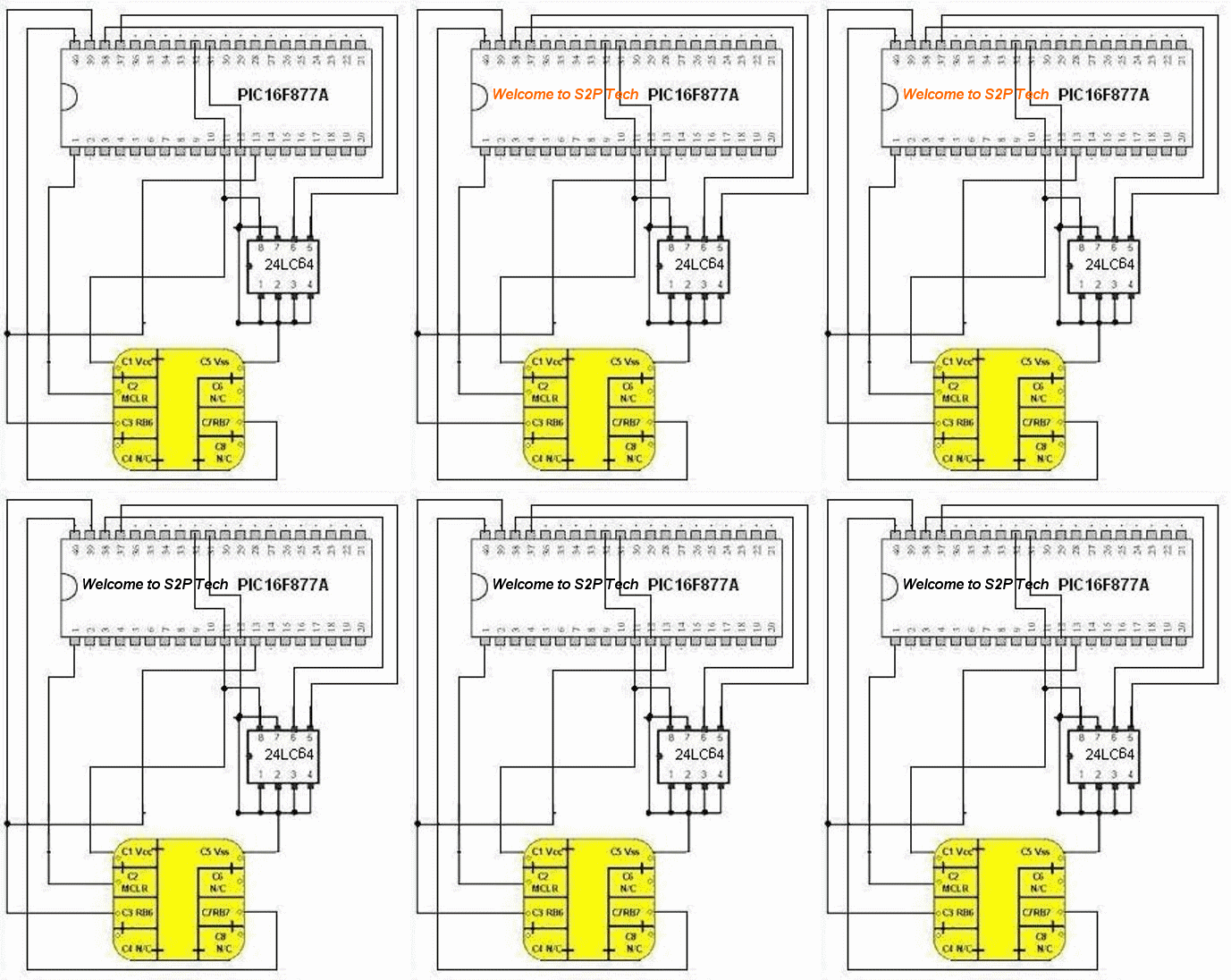
Now connect PIC16F877A, 24c64 and sim card adapter. see figure3.

GSM Sim Clone using Microcontroller
figure 3

you have done it..! just connect this gadget with your mobile phone and enjoy. If you have any problem regarding this please comment below, I'll try to solve it. and if you are interested in this work please don't forget to share on facebook. (  just click and share the fb like button top of the page :-)  )
 NOTE: You can write up to 10 different KIs and IMSIs to this gadget. In above Step 2 you can select "Positions" (0 to 9) and enter different KIs and IMSIs. then you can see a new menu in your phone "SIM-EMU Configurator". you can switch between SIMs by entering this menu..

Read More

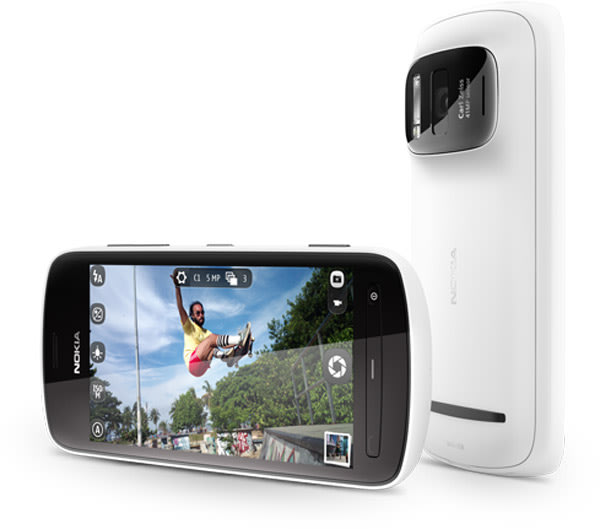
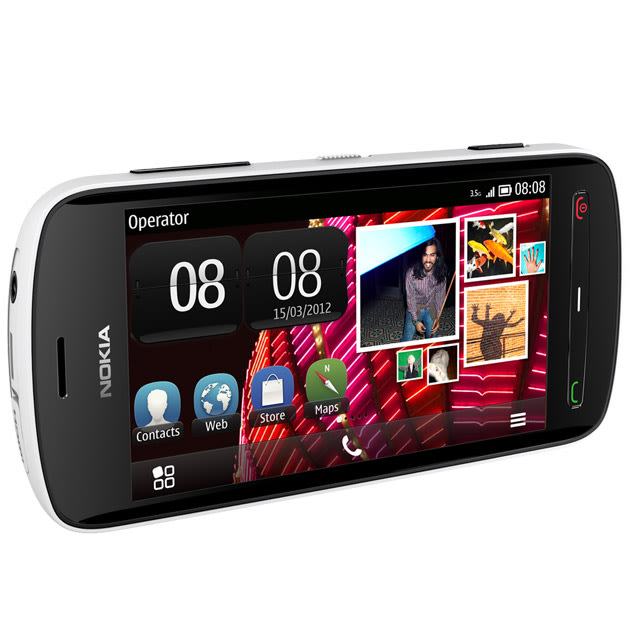
Nokia launches 41-MP camera smartphone : 808 Pureview


At the Mobile World Congress in Barcelona, Nokia announced the 808 Pureview, a flagship Symbian device with a 41-Megapixel camera. In addition to superior still imaging technology, the Nokia 808 PureView, also includes full HD 1080p video recording and playback with 4X loss less zoom and the world's first use of Nokia Rich Recording. It  is expected to launch in Europe in May. At 41mp, the phone is able to shoot images that Nokia claims can be printed at “poster size”. Files, however, condense four or five pixels into one, and Nokia claims they are smaller than equivalent products from rivals. A Carl Zeiss lens shoots in continuous focus HD video, at 1080p.


The 808 uses the Symbian platform,with excellent imaging technology
The device uses a 1.3GHz processor, comes with 16GB of storage and runs a 4" screen at 360 x 640, which is below HD resolution.
Nokia also announced that it was expanding its range of Windows Phone devices for Europe.

Nokia 808 Pureview                              Nokia Smart Phone                    Nokia 808 Pureview

Read More

COMMON GSM NETWORK CODES


  • Type *#61# and press call - Check redirection status.
  • Cancel all redirections: ##002# 
  • *43# to activate call waiting, to deactivate #43#
  • If your phone doesn't have incoming call barring and outgoing call barring, you can try this. For outgoing call barring dial *33*barcode*# and pres OK. To deactivate it dial #33#barcode*#
  • On any phone on any network type in **43# to enable conference calls. You can make up to 7 calls at once
  • If you need to block SMS reception (if you are spammed by someone) just press this code: *35*xxxx*16#     (xxxx) is your Call Barring code (default is 0000). 
  • To remove this barring type: #35*xxxx# 
  • If you want to hide/show your phone number when calling, put one of these codes below in front of the number that you are going to call. *#30# / *#31# or *31# / #31# ) Works on some networks.
  • Typing *0# or *nm# on the beginning of a txt message gives you detailed delivery report on some networks.. But turn off reports in message settings before.
  • When the sim card-pin blocked type **042*pin2 old*newpin2*newpin2*

Read More

All Airtel Mobile Codes


1. How to Check Main account Balance :::: *123# n then call.
2. How to Check A 2 A Balance of Call:::::: *123*1# N then Call.
3 How to Check A 2 A Balance of Messages:::::*123*2# N then Call.
4. Balance Transfer::::: Minimum Balance Required to transfer is Rs 240. Procedure::: *143*Senders Mob No# N then Call. Sender>>> Rs 55 Deducted n Reciever>>> Rs 50 Credited. Allowed this Procedure Twice a Day.
5. Validity Extension:::::: Procedure:::::
*144*001# N call >>> Deduction Made:::: Rs 8>>>1 day Validity Extend.
*144*005# N call >>> Deduction Made:::: Rs30>>>5 Days Validity Extend.
*144*010# N call >>> Deduction Made:::: Rs 50>>>10 Days Validity Extend.
*144*030# N call >>> Deduction Made:::: Rs140>>>> 1 Month Validity Extend. Bt Now these days Rs 98 recharge option is available in which u get 1 month Validity N Rs 9 Talktime.
6. Automatic Validity Extension ::: Activate ::: *144# N then Call. Rs 6 Deduction. Deactivate :::*144# N then Call. Status Check :: *144*999# N then Call.
7. Postpaid to Prepaid Recharge:::::: *107*375* Senders Number(ie Prepaid Number)# N then Call.
8 Excuse Me Service :::: Activation Procedure :::: *104# N then Call… Charges >>>> Rs 1/ request. U Get a Fake Call frm Airtel.
9. Check the Value Voucher Validity::::: *121# N then Call.
10. Check the Validity :::: *122*1# N then Call.
11. Recharging Paper Coupon:::: *120*16 Digit Pin No# N then call.
If U want to know Any Kind of recharge Information >>>> Simply Type in Ur Text Message ::: RC Amount>>>>170(Toll Free) U get all the Information.
Read More

Some Nokia’s Secrets…

With Nokia codes or Nokia secret codes you can access hidden features and gain information about your Nokia phone. Many of the Nokia codes are only normally used by Nokia engineers. Nokiainfo.net takes no responsibility for any data loss resulting in using these Nokia codes.
Nokia code Code function
*3370# This Nokia code activates Enhanced Full Rate Codec (EFR) – Your Nokia cell phone uses the best sound quality but talk time is reduced my approx. 5%
#3370# Deactivate Enhanced Full Rate Codec (EFR)
*#4720# Activate Half Rate Codec – Your phone uses a lower quality sound but you should gain approx 30% more Talk Time
*#4720# With this Nokia code you can deactivate the Half Rate Codec
*#0000# Displays your phones software version, 1st Line : Software Version, 2nd Line : Software Release Date, 3rd Line : Compression Type
*#9999# Phones software version if *#0000# does not work
*#06# For checking the International Mobile Equipment Identity (IMEI Number)
#pw+1234567890+1# Provider Lock Status. (use the “”*”" button to obtain the “”p,w”" and “”+”" symbols)
#pw+1234567890+2# Network Lock Status. (use the “”*”" button to obtain the “”p,w”" and “”+”" symbols)
#pw+1234567890+3# Country Lock Status. (use the “”*”" button to obtain the “”p,w”" and “”+”" symbols)
#pw+1234567890+4# SIM Card Lock Status. (use the “”*”" button to obtain the “”p,w”" and “”+”" symbols)
*#147# This lets you know who called you last (Only vodofone)
*#1471# Last call (Only vodofone)
*#21# This phone code allows you to check the number that “”All Calls”" are diverted to
*#2640# Displays phone security code in use
*#30# Lets you see the private number
*#43# Allows you to check the “”Call Waiting”" status of your cell phone.
*#61# Allows you to check the number that “”On No Reply”" calls are diverted to
*#62# Allows you to check the number that “”Divert If Unreachable (no service)”" calls are diverted to
*#67# Allows you to check the number that “”On Busy Calls”" are diverted to
*#67705646# Phone code that removes operator logo on 3310 & 3330
*#73# Reset phone timers and game scores
*#746025625# Displays the SIM Clock status, if your phone supports this power saving feature “”SIM Clock Stop Allowed”", it means you will get the best standby time possible
*#7760# Manufactures code
*#7780# Restore factory settings
*#8110# Software version for the nokia 8110
*#92702689# Displays – 1.Serial Number, 2.Date Made, 3.Purchase Date, 4.Date of last repair (0000 for no repairs), 5.Transfer User Data. To exit this mode you need to switch your phone off then on again
*#94870345123456789# Deactivate the PWM-Mem
**21*number# Turn on “”All Calls”" diverting to the phone number entered
**61*number# Turn on “”No Reply”" diverting to the phone number entered
**67*number# Turn on “”On Busy”" diverting to the phone number entered
12345 This is the default security code
press and hold # Lets you switch between lines
Read More

Make Your Mobile Number As Not Reachable!

No need to remove SIM or Battery

Make Your Mobile Number As Not Reachable!We sometimes don’t want to receive calls at a particular time. But the caller understands that we are not receiveing call.
So make your phone as unreachable and the caller will thought that its a network problem. No need of removing sim card! Lets start the game!
Go to Menu> Settings> Phone> Operator selection> Manual! Now your phone will search for available operators. Select any other network except your own network (i.e. If you are using Airtel, select vodafone in). You’ll get an error message No network access! Now look at the signal bar. It is empty! But dont press back. If you press back, the phone will capture signal again. If any caller call you then, he will hear that your phone is out of network range! This trick works on almost every phone.


Read More

Almost Free Calls With SMS Discount

Save on International Calls and Text Messages Using SMS Discount

People are attracted to free VoIP calls because they can give them substantial amount of savings. However, not all free calls are really free. Most of the time, there’s a string attached to the offer. If you are careful and fortunate enough, you might be able to find some real free offers just like what is offered by SMS Discount.
SMS Discount has several free offers that you can take advantage of after downloading their free tool in your computer or mobile phone. After which, you can already start making free calls anywhere in the world. Sending text messages is free too.
Free calls apply to some popular destinations and minimal rates to others. You can check their Web site for the countries where you can make free calls as well as the rate for other destinations. If you buy credit from them, you can also avail of 120 Freedays.

This is such an excellent offer you must take advantage of.


Read More

India will have 11-Digit Mobile Numbers in coming years.

With phone operators expected to run out of 10-digit mobile numbers soon, the Department of Telecom (DoT) is now considering an 11-digit numbering system.

“With so many telecom service providers and a growing customer base, the need for new numbers and their consequent shortage will be felt soon,” a senior telecom official told reporters on Saturday.
Senior DoT sources said that TEC recommendation for the new numbering plan had already been forwarded to the government for a final decision.

The telecom department had come up with a 30-year numbering plan in 2003 but the fast growth in the telecom subscriber base has forced the authority to relook into its policy and consider 11-digit numbering system.
“The infrastructure is ready and this should be implemented within two years,” one of the technical official said. Telecom operators said the new policy would not cause any technical problems.
The only two other countries to use 11-digit numbers are China, whose subscriber base of 624.16 million (as in January) is far ahead of India, and the UK, which uses it apparently for technical reasons as its subscriber base is much lower.

“The change, however, will be in the software only and it will not take more than a month to upgrade the changes,” the telecom official said.
Read More

Introducing Custom Mobile Blogger Templates


Share This Article!-

The Blogger team has continued adding new and better features to the blogspot platform and recently it introduced custom mobile templates for the blogger platform. These days, the number of blog visitors who access the blog using their mobiles is increasing and its better if we have a mobile theme for our blogspot template.


Here is a picture of the mobile blogger template.


To add the mobile template to your blog, visit the Template tab from the dashboard and then click on the Gear button just below mobile option as seen in the above picture. Select the Yes option and you will get a list of mobile templates for your blog. You can choose any one of the mobile templates that Blogger is offering or else you can select the custom template if you want the template to be similar to your desktop template.


Select the template of your choice and then Save it. Now you can visit your blog using a mobile and check the new mobile template.
Read More

Hacking Tips To Use Mobile Number Portability (MNP) In India By Dailyhackingtips


Mobile Number Portability has already been launched all over India.Now the customers have more freedom and operators have more competition.For those who are unaware about MNP let me give them a brief introduction.
Mobile Number portability allows the customers to change their operator without changing there mobile number.This feature was first rolled in haryana and now it has been rolled all over India.

In this post I will try to answer all the queries of users about Mobile Number Portability.The issues that I am addressing in this post are:-
•    How To Change Mobile Operator?
•    How Long will it take to Switch to new Service Provider?
•    What are the charges of MNP?
•    Is MNP also available for Postpaid customers?
•    Can I migrate from Postpaid to prepaid using MNP?
•    Can I migrate from CDMA to GSM using MNP?
•    How Frequently  I can change my operator?


How To Change Mobile Operator?


To porting your mobile number to another operator you need a Unique Porting Code (UPC).So here is the complete steps of switching your operator
1.    Send a sms to 1900 in the following format

PORT <your Mobile number>
Eg:- PORT 94XXXXXXXX
1.    Now you will receive your UPC from 1901.It will be a 8 digit alphanumeric code along with the expiry date.It automatically gets expired after 24 hours.
2.    Now visit the new operator shop and fill a mobile number portability form there.
You will need to fill the following information
Your Mobile number
Your current operator
The UPC code that You received
1.    You have to submit your Address and ID proof’s.Your photograph and post paid bill (if you have a postpaid connection)
2.    Now purchase the new sim card from the new operator.
3.    Follow their instructions
4.    The maximum charge for this service is Rs 19
How Long will it take to Switch to new Service Provider?
It can switch between 24 hours to 4 days.Don’t worry your old connection will work until you are ported to new number.
The maximum time during which your number will not function is 2 hours and during night (12 pm-5 am).So it won’t affect you much.
What are the charges of MNP?
The maximum amount that can be charged is Rs 19.

Is MNP also available for Postpaid customers?
Yes, MNP is also available for postpaid customers.But you have to clear all your pending bills to use MNP.

Can I migrate from Postpaid to prepaid using MNP?
Yes,you can migrate from postpaid to prepaid connections using mobile number portability.

Can I migrate from CDMA to GSM using MNP?
You can Migrate from CDMA to GSM connection.But it will make your CDMA phone useless so choose wisely.

How Frequently  I can change my operators?
For using Mobile Number Portability (MNP) your connection needs to be atleast 3 months old.So after 3 moths you can change your operator.
Read More

How To Track Lost Mobile

Now a days each one of us carry mobile devices and always fear that it may be stolen. Did you ever lost your mobile and found no help from police or mobile operator in mobile tracking? Well now you don’t need to be worried about it. Each mobile carries a unique IMEI i.e International Mobile Equipment Identity Number, which can be used to track your mobile anywhere in the world.
This is how it works!!!
1.    Dial *#06# from your mobile.
2.    Your mobile shows a unique 15 digit.
3.    Note down this no anywhere but except your mobile as this is the no which will help trace your mobile in case of a theft OR you can get it by looking back side of mobile packet cover or receipt of the bill.
4.    Once stolen you just have to mail this 15 digit IMEI no. to cop@vsnl.net
5.    No need to go to police.
6.    Your Mobile will be traced within next 24 hrs via a complex system of GPRS and internet.
7.    You will find where your hand set is being operated even in case your no is being changed.
PASS ON THIS VERY IMPORTANT MESSAGE TO ALL YOUR FRIENDS AND RELATIVES.
If you lost your mobile, send an e-mail to cop@vsnl.net with the following info.
Your name:
Address:
Phone model:
Make:
Last used No.:
E-mail for communication:
Missed date:
IMEI No.:
Note: The owner must report to their local operator with the IMEI no, the local operator will block the device. Once IMEI is blacklisted, the cell will not respond to any service provider network. Even if you receive your cell, it is very difficult to reactivate it.
Update:
Probably cop@vsnl.net discontinued their service as many people haven’t got any response from them. So, this method will not work anymore.
Read More

How to Trace a Stolen Car using Mobile Phone Technologies?

First of all there is a need to know about the GPS (Global Positioning System) through which the vehicle tracking is made much simpler. GPS is nothing but a system where you can know the position and time of an object using the Global navigation satellite system. It is a group of satellites which receive signals from the GPS transmitters and sends data to the receivers. The GPS thus enables you to know the exact location, speed, events like opening/closing of doors, fuel levels and much more data regarding your vehicle when your vehicle has a GPS unit.
 
There are different types of vehicle tracking systems. Passive tracking involves the devices which store data and needs to be removed and fed on to a computer system for downloading the data and analyzing. Whereas active tracking involves devices which receive similar data but transfer them on real-time basis through cellular or satellite modes. Few transmitters can work both ways; when there is cellular network available, they act as active devices and when it’s not available they act as a passive device. They can also be categorized as analog and digital devices based on the type of signal used to communicate.
The components in a vehicle tracking system mainly involves a GPS tracking device (transmitter) which is fitted inside the vehicle where it can’t be easily detected by the vehicle thief and hence can’t be deactivated easily. The GPS transmitter sends signals continuously to the monitoring station. Next is the GPS server which takes care of the data/signal reception, stores it securely and provides the data when asked for. Finally the GPS interface or the control system is the one which triggers the alarm that the vehicle has been stolen and immediately facilitates the tracking process.
This GPS interface can be operated through mobile phone technologies like an SMS or an alert call and so on. When you notice that your vehicle has been stolen, immediately SMS the required code to the required number. This results in switching on the alarm and thereby the security agencies can access details like the location, speed etc through the GPS server and can track the vehicle.
Few advanced vehicle tracking systems off late have been capable enough of operating vehicle controls like door lock, engine on/off, fuel switch, steering lock and even brake and clutch. This can render the thief with very few options. Sometimes they are also enabled to send automatic signals to the pre destined cellular numbers when found operated by unauthorized persons.
Vehicle tracking systems can be operated through cellular networks or satellite group networks. Few global vehicle manufacturers have incorporated their own built-in devices in their vehicles and give their customers the choice of subscription to the service. They have also incorporated other features like automatic crash response systems, in-built navigation helper etc by using the same technology.
The vehicle security is greatly increased with these tracking devices through mobile phone technologies and at the same time note that the theft insurance value of your vehicle is greatly reduced. Nevertheless it is always worth having a vehicle tracking system to provide an unparalleled security to your vehicle.
Read More

How to Protect Your Personal Information on Mobile Devices

Remember the days when a cell phone simply had your telephone contact list and no other crucial information? Currently, it seems that everyone’s mobile phone has almost all of their personal information, from checking accounts to password reminders, placed squarely in a tiny electronic memory. But, similar to losing a purse, what would happen if you lost your phone? As smart-phones become more widespread, the possibility of losing your phone, and all of its pertinent data, can be catastrophic. If you are not careful to protect your device, a thief can easily find and steal your money from the bank and make instant purchases through the mobile applications, or apps. What can a person do to protect themselves?
 
Do Not Save Passwords
Many mobile phones allow you to surf the Internet; you can check your email and purchase necessary items through your device. However, most websites will ask you if you would like to save your password for future convenience and access to the specific account. A good rule of thumb is to never save passwords through your device; if lost, the thief can easily look through your email and spend your money on purchases through the saved password website. Although it is a hassle, you should have to enter your password each time you access the particular website.
Backup Your Data
Nothing is more frustrating than losing your cell phone with no backup data in your personal computer. Periodic data backups are crucial to ensure that most of your information is saved in a secure area. Back up your data either on a daily or weekly schedule; much like DVD duplication, if the phone is lost, you can easily load the information back onto a new device and carry on. As long as thieves cannot access your password through the old device, your information should be safe.
Mobile Protection Applications
Many smart-phone application engineers have designed apps that can track and wipe memory from a lost or stolen device. The phone’s owner simply needs to log in to their account on a regular computer; they can activate the GPS (Global Positioning System) embedded within the device and choose to remotely clear all the memory from the phone. If you have been regularly backing up the data on your home computer, this wipe will allow you to feel confident that your information is safe and can be added to a replacement device.
Password Protect
You know that annoying choice on almost all mobile phones, called password protect? Use it. Although it may be cumbersome to type in your password each time you access the device, this simple beginning screen can thwart an attempt at hacking your information if the phone is stolen. Choose a password that you will remember, as well as making it difficult to crack, such as adding symbols and capital letters.
Recommended Reading: How to Create Secure Passwords.
Do Not Enable International Calling
International calls can be placed quickly on a stolen phone, possibly before a victim knows that the phone is missing. As a result, you should always disable international calling and protect it with a password. Even a few calls placed on the phone can easily add up to hundreds of dollars.
Call Your Mobile Carrier
Notifying the carrier of your loss is a step that many people fail to perform after a phone becomes lost or stolen. The carrier can deactivate accounts and place the phone’s serial number on a lost or stolen list. Although it will probably never surface again, if the thief tries to sell it, the serial number will be flagged through the carrier’s database.
Read More

How to Get Better Cell signals for Mobile Phones of Different Generations?

Modern man cans nothing without a mobile phone, especially if he is in constant motion. It is impossible to run business operatively and to be on communication with your relatives and friends without the cellular phone. However, the mobile communication is still far from perfect. And it is not rare when the connection during the wireless communication interrupts and to contact the subscriber again you have to go outdoors. But modern technologies are evolving, and today it is possible to solve this problem.
If certain places have poor cellular communication, it is not the fault of your mobile operator. The reason is in the poor cellular signal. If the signal is weak, no one phone will be able to maintain the level of the wireless signal to provide the stable connection. And it becomes obvious that if the cell signal level is low, you need to have a special device that will strengthen the cellular signal. The gsm repeater is such device. However, there are some modifications of cell phone boosters, depending on your goals.
There are cellular amplifiers that operate primarily on the transmission of speech for mobile phones that run on 2g phone. Signal amplifier operates in the gsm frequency of 900 or 1800. Such gsm signal amplifiers for 2g phones take up the bulk of the market niche. And these cellular boosters will keep their leadership for a long time. Some people try to increase the Internet connection speed via these gsm repeaters. However, they don’t reach the desired effect. In most cases such use of gsm signal amplifiers leads for the opposite effect – the speed of the Internet connection reduces and mobile communication is getting worse. The phone signal repeater is designed exclusively for use with mobile phones, more precisely – to maintain the stability of the cellular signal during the conversation. One more advantage of the cell phone booster is that the mobile signal amplifier does not limit the subscriber in the choice of mobile operator or the number of calls.
 
The CDMA standard appears not so long ago. It greatly improved the quality of cellular communication. The mobile phones that work in this standard, operate in the frequency range 800/850 Mhz.
If you want to amplify the cell signal of your 3g mobile phone, you will need a 3g repeater. The 3g phone signal amplifier operates at a range of frequencies at 2100 MHz. This 3g signal booster provides more advanced capabilities than 2G. Firstly, you can make video calls and videoconference with the help of such 3g cell phones. It is also possible to connect the Internet on high-speed. All these features require a stable broadband signal. The demand for these 3g phone repeaters is growing every day.
And one more very promising standard for cellular communications today is Wimax. This is the standard of the newest generation, or 4G. The phone signal booster for this standard, which operates in the frequency range of 2.5 GHz, is in the process of improvement for the moment. Today the users of 4g cell phones can utilize only passive means of wireless amplification. The antenna is not really a convenient way to gain the poor signal, moreover, it’s inefficient.


Read More

What Type of Mobile Phone User are You, Really?

The truth is that all of us would be lost without our mobile phones. Did you notice how the mobile phones slowly and discretely crept into our lives? And they are here to stay! Just a couple of years ago they were the latest thing in technology and the privilege of the wealthy people and today. Well, just imagine spending a week without your mobile phone by your side. Impossible! Being such a big part of our lives and being something that you take with you all the times, your choice of this gadget says a lot about you. Actually, you can classify people according to their attitude towards mobile phones.


The “I Only Have It Because I Have To” Type
This is type that has a mobile phone simply because others need them to have it. These people are usually our mothers, fathers, uncles and older people. Their mobile phones usually have only the most basic functions and endless battery lives. You will never see them using an online mobile shop as they often just take the old mobiles that their kids don’t need any more after buying the latest model. They don’t text, and they don’t read texts sent to them.
The “Average Joe” Type
The “Average Joes” of mobile phone users are usually male users in their forties. They like to have reasonably new mobile phones and they tend to buy phones from time to time in order to maintain the value of their money invested in them. Good thing about them is that they are always available, they read and answer texts you send them in a timely manner and they use the phones “as they should be used”. There isn’t really some distinctive characteristic for this type of user aside from the fact that we all know that mobile phones are just replacement for their childhood toys. Boys and their toys!
“Does My Phone Match My Purse” Type
I’m not trying to be sexist here, but the truth is that this type usually includes girls of all ages. Especially teenage girls. They don’t really care about the functions and the features that their phone provides them with, besides the camera. The camera needs to be perfect! The most important thing about their mobile phones is that they are the latest fashion and that you can put all sorts of stickers and trinkets on it so that it looks cute and matches your look. These users will answer to all the texts ever sent to them and spend hours taking to their BBFs. The bad thing – if you try to call them, they will probably be already talking to somebody.
“Phone Is My Best Friend” Type
You will probably find these types glued to the windows of the local mobile shop, drooling over the latest type of mobile phone. They already know all there is to know about the phones that are not even released yet! The features, the appearance, the advantages and the weak points – by the time you buy the latest model there is – it’s already old news to these guys. Don’t bother texting them – they are online all the time – email them!

So, which one are you?
Read More

Top Five Mobile Apps

There on thousands upon thousands of apps available. There range from games, business applications, to navigation tools. It’s impossible to try them all, so we’ve organized a list of the most useful and interesting mobile apps.
1. AroundMe


 In their own words, “AroundMe quickly identifies your position and allows you to choose the nearest Bank, Bar, Gas Station, Hospital, Hotel, Movie Theatre, Restaurant, Supermarket, Theatre and Taxi.” It’s the fastest way to find what you’re looking for, when you’re looking for it, based upon where you are. It also gives you directions so once you find what you’re looking for it’s easy to get there.

2. Chit Chat for Facebook on Blackberry
 We all know Facebook’s chat tool is limited. In this creative review it’s noted that it’s “minimally functional and boasts few of the features commonly available in modern chat tools.” Chit Chat is a Facebook Chat utility that was recently ported to Blackberry. With it people can enjoy a seamless chatting experience with the world’s most popular social network. It’s especially useful given Facebook’s recent regression in their online chat tool.
This Blackberry Facebook application has been developed as another line in the “Chit Chat” brand. Chit Chat for Facebook is a messaging application that is popular in the Middle East for Facebook communication on ones desktop. The Blackberry application is, however, much better looking than its Windows desktop partner application.
3. Pandora, on the iPhone


We all know Pandora provides free personalized radio on the web. It’s available on the iPhone as well now. For those who already have an account the iPhone app is fully integrated with the web version. They can keep your same favorite stations and listen to them wherever you may be. Otherwise you can sign up for a free and start listening to tunes on your iPhone whenever you like.
4. RedLaser
This is a nifty bar code scanning tool that provides a variety of information. You can check prices, find stores nearby that sell that item, or check allergens or other product related info. You can even scan books and locate them in the nearest library, store, or online retailer. It’s an easy way to comparison shop when you’re out and about. It’s available on iPhone and Android and supports nearly every type of code available including QR codes, UPC, and others.
5. GetGlue


Want to share what you’re watching, listening to, or reading with your friends? Then you need GetGlue. It’s the leading social network for entertainment. You can get recommendations from friends as well as earn rewards from GetGlue partners. It’s a great way to see what the latest popular or interesting shows, songs, or books are. It’s ported to nearly every mobile device available.
These five must have apps are the standout mobile applications that all users should get. They area both helpful and fun to use. With all mobile applications, is worth installing them and seeing if they fit you. If not, you can uninstall them and add something else!
Read More

Balance Transfer Tricks For Airtel, Vodafone, Idea, Tata Docomo, Uninor and BSNL


Idea
Method 1:
  1. First of all send message to 55567 as 'ASK'Mobile NoAmount.Which will ask the person from whom you want to get Balance.
  2. Then the person to which you have to get amount, have to confirm your request by sending SMS as'GIVE'Mobile NoAmount
  3. Then You have Done...!
  4. Conditions:

    1. You will be charged Rs/- 2 for this method.
    2. You must have balance transfer more than Rs/-11
Method 2:
  • Follow the below Steps:
  • Step1: Dial *567*friend mobile number*amount# [eg:*567 *9092 XXXXXX*50#]
  • Finish......
  • Terma and Conditions: You Will Be Charged Rs/- 2 For this Method.

Vodafone 

Procedure:

*131*Amount*Mobile No#

Conditions:

Only Users Who Are Using Vodafone From 3 Months Can Able To Do This.

TATA DOCOMO
  1. Type "BTTarget Mobile Number Amount" and send it to 54321
  2. To reverse the Amount a Member needs to type "RBTTransaction ID" and send it to 54321
  3. SMS to 54321 for Balance Transfer will be charged at Re.1 and for reversal will be Toll Free.
Conditions:
The sender’s account balance for "Balance Transfer" has to be Transfer Amount + Rs.1 at the time of transfer. If balance is not sufficient the transfer will be declined. However, the SMS will be charged.
In case of Reversals the amount reversed will be dependent on the balance available with the recipient.
The system will recognize "BT" or "bt" or "Bt"
For Example to Transfer Rs.25 Talk-time from 9030012345 to 9030099999 . The sender types "BT 9030099999 25" and SMS to 54321

Uninor Balance Transfer Trick
Follow the below steps:
  • Choose the amount to transfer.
  • Dial *202*friend mobile number*amount# [eg: *202*962XXXXXXX*50#]
  • Finish your amount has been transferred.
  • Terms and Conditions: Minimum balance should be rs.5/-
 Airtel 
Method 1: 
  • SMS GIFT amount friend number GIFT 100 9920XXXXX.
  • You will recieve a message saying you have that your amount has been transferred to 9920XXXXXX
  • Terms and Conditions apply for transferring balance. Minimum Balance Rs.1/-
  • This trick works only in some states please try this trick with low balance first and go for bigger amount.
Method 2: 143*9818xxxxxx#

BSNL Prepiad Balance Transfer Trick
Follow the steps below:
Step1: SMS " GIFT friend Bsnl number amount " to 53733 or 53738 [eg: GIFT 949XXXXXXX 50 ]
Terms and Conditions apply.
: : REMEMBER : :
1. Balance Transfer Trick is only available to their networks only like airtel to airtel , vodafone to vodafone etc..
2. Terms and conditions apply for balance transfer
3. Minimum Balance should be Rs.1/- in all indian sims.
Read More

How to Reset Your Mobile Memory Card Password


If you set password for mobile memory card, then you should be not forget the password. If you does then the only option is to formate your memory card with the help of the card reader and eventually the loss of all your data stored on it. There is a way to break the security wall. If you are a Symbian device lover then no need to worry about the password. You can crack them in few minutes.


In this tutorial I am going to teach you how to reset your memory card password in easy step. Before we start you need to have X-plore (application used to explore your system files and folder even the hidden folders in your device)

  • Install X-Plore in your mobile. If you want to download X-Plore search around internet you can download free trail.
  • Open your X-plore apps and Press 0(Zero) and check which you have marked the "show the system files"
  • Once you done that now go to the following path C:/Sys/Data/Mmcstore
  • Once you reached there you need to press "3" under option to set it in the Hex-viewer
  • See the third column you will able to see a line of code ! TMSD02G (c??"?x???1?8?1?1?3). Just check the character between the "?" it is your password ie: 18113


Note: If you have not set the password, then you will not able to gain access to C:/Sys/Data

Read More