Showing posts with label Internet Tricks. Show all posts

How to Protect Gmail Account by using 2 Step Verification

If you want solid protection of your gmail account then you should read our previous post 4 Solid Tips to Protect Gmail Account From Hackers and if you’re more serious about security of your Gmail account and in anyway you don’t want to compromise with your gmail account and make it bullet proof then this2 STEP VERIFICATION method is for you. Well this is the best security method for Protecting Gmail Account and Currently I am also using this method.

Once you have activated 2 Step Verification of Your Gmail Account then everytime along with your email and password for login you need a special pin which is sent to your phone by gmail. so let’s begin..
Steps to Protect Gmail Account by using 2 Step Verification are as follows :-
1) Login to your Gmail account
2) Click “ My Account “ on top right side of your gmail account [ watch below image for going to My Account ]

gmail account protection 1

3) Now you will be redirected to new page under security options click on ” Using 2-Step Verification” for the Sms Configuring.

gmail account protection 2

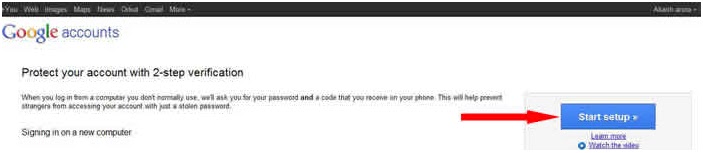
4.) Now Click on Start Setup

 gmail account protection 3

5) Now you’re on Set up of 2 Step verification First Select your Country then enter your mobile number. you can also select the option for getting PIN[ code ] via text or voice call. Now click send code you will got then enter the code to verify and click Next.

gmail account protection 4

6) Again click Next and then click on Turn On 2 Step Verification that’s it.. you’re done now. Now everytime when you sign up to your Gmail Account from any public computer you need code for signing up to your gmail a/c.

Note : Once this service is started you will also received email for backup options.

Read More

Four Solid Tips to Protect Gmail Account From Hackers


Security of your Gmail account is very important matter. Think what happens if someone hacked your gmail a/c password. However by default gmail has many built-in security features to provide good protection to your account but many Gmail A/C’s are HiJacked by Hackers due to mistakes of users.
Actually Users are not so aware about the double security feature of gmailand many more smart features of Gmail. Most of Us when Sign-up to any service provider like Facebook, Youtube, Blogger etc.. we use Gmail for creating a/c with them that means gmail has become very important part of our life like our mobile phone but in this Genration Hackers are very smart they are just look at your single mistake and they stole your unvaluable email account password and get your all important data. This Post Provides you 4 Solid tips for Protection of your Precious Gmail A/C So that hacking of your gmail account become impossible.
Tips to Protect Gmail Account From Hackers are as follow :-
1) 2 Step Security Verification :  Who are very serious for the protection of their Gmail A/c then this feature is must for them. First know that this Feature is offer by Gmail and is not the default feature of your account you have to activate this feature in order to double protect your account.By using 2 Step Security Verification even some one HiJacked your Gmail username & password but still he can’t get access to your account because he don’t have access to your mobile phone.. Excited ! it is true. By using this security shield no one is able to Hack you’re a/c. Read Detail Steps of Protecting Gmail Account by using 2 Step Verification.
2) Always Check last Account Activity : If  you really don’t want to compromise with your important data then always check last account activity. This is also a very smart feature of gmail. You can check Access type(Browser, mobile, POP3, etc.), Location (IP address) and Date and Time also according to your time zone. usually will see this details in the bottom right of your gmail a/c.
3) Always use https[ Secure connection] : Well by default gmail comes with secure connection but for security reasons you should double check it. Go to Settings [ if you're using new gmail ] watch below image for going to settings
protect gmail account 1

Now you will redirect to Gmail Setting Page scroll your mouse usually in 5th option there is radio button option with Browser connection > click on always use https and click save.
4) Strong Passwords:  I place this point in last but this is also very important. Well many of us are aware of using secure passwords but are not using secure password may be for the easiness and for the  fear of forgeting or another one. If that is your reason or anyother than you can also note it down in your diary. Using secure password is very helpful if you use secure password [ letter + Symbol + Numbers ] = [ A-Z, a-z + !@#$%^&* + 0 , 1-9 ] then it will become impossible for any hacker to Guess your passwords. So always use strong passwords.
Follow above tips and make it impossible for anyhacker to stole your email a/c. If you want to share some more security tips for protection of Gmail Account then plz share..

Read More

Track Gmail Sent Emails As Soon As They Are Opened


track gmail sent emails1
 Uncertainties are those added ingredients of life which are really unwanted but are obviously true, isn’t it? Sometimes they might cause you to pay huge. Think about a scenario where an important E-mail sent by you to a client doesn’t get delivers to him. If you are a Freelancer, you can imagine what it can cost you if your mail doesn’t reaches to its destination due to any reason whatsoever. In Professional dealings, what really matters is-accuracy in terms of delivery time. To make it clearer, consider a situation where you are asked to deliver the task at 00:00 sharp.
You switched on your machine ten minutes before, logged in to your account, attached the sample, and sent it. there are two bitter uncertainties expected, firstly, all the process stated above might consume more than ten minutes and your delivery gets late, Mind you that each minute matters in business. Secondly, there is an equal probability that your mail doesn't reaches the destination due to any error (connection error, network error, etc). After making the need clear, Think about scheduling your important mails to ensure accuracy in delivery time, at the same time, getting notified the moment your client opens up your mail. How amazing that would be?

The idea is not new, so isn’t the need! Understanding the need, Microsoft outlook offer the option of sending a “received notification” from the receiver, but again, the idea was totally left on the receiver’s disposal. Having been inspired by the notifications send by 123greetings, I have been waiting for a similar feature since a long time, where the sender gets notified when the receiver opens the mail; and again, its Google which has facilitated the thirst of its users by ensuring an easy way to ensure that the mail has been delivered and seen by the receiver. All you need to have is a Gmail account.

If you are a consistent Gmail user, you must be wondering why you never come across this ‘really-must-avail’ option. The reason behind is, you need to install an additional Chrome browser Extension, known as RighInbox. This extension allows you to send scheduled mails as well as allows you to track your E-mail to know when it gets opened at the receiver end.
1.  Install the Extension and There You Go!
Unlike other extensions needed for other browsers, Rightinbox is an easy to find and easy to use extension. All you have to do is to click on the link and install.

track gmail sent emails2

2. Re-open or refresh the page
Once you install the extension, you are required to open your Gmail account or refresh it if it was already opened. You will see a pop up screen, notifying about the new extension working. Click Continue.

track gmail sent emails3

3. Grant Access
The next you will see on your screen, will be a page where you get to know about the privacy policies and you will be asked whether to grant access or not, click on Grant access and move on.

track gmail sent emails4

4.  Enjoy the best Added Features!
You are almost done! It’s time now to utilize it. Go to compose mail and the following page will appear:

track gmail sent emails5


You can now send the mails later by scheduling them. This is a perfect blessing for those who forgot to wish their loved ones on special occasions. Sit once with a diary or a sibling who knows special dates. Schedule your mails and become reliable!
As you can see, the check box with the Track option needed to be checked in order to get the mail been tracked till the time the receiver does not opens it.
That was all for now, hoping that the tutorial turns out useful to you. Do Share your views about this feature.

Read More

25 Awesome Google Search Tips To Become a Better Searcher


We all love Google. It is perhaps the greatest search engine ever. Lots of people use it everyday. And many others have set it not only as their default search engine, but also their browser homepage. And there's a good reason for that. Google isn't just s search engine, but asmart search engine. It doesn't just list everything present on the web. It does a lot more than that. If you are the kind of person who searches Google by trying different combinations of keywords until finally getting what you're looking for, then let me tell you this. You are performing search in a primitive style, and it isn't 2005 anymore. Google now provides a lot of extra features, using which you can become a "power" Googler. So here are some search tips and tricks that you'll find useful, and that will also save you some time and effort.

1. Similar search


Often, you can't think of words similar to a keyword, that might help you. For example, you might be looking for WordPress tutorials. You can use the tilde sign (~) before the word you want synonyms for. For example;
WordPress ~tutorials will bring up WordPress guides, resources, manuals, and more.


2. Explicit search


If you want search results that have an exact phrase, then encapsulate that phrase within quotes in Google search
"my blogger tricks".

3. Excluding a word or phrase

Use a minus (-) sign to exclude a word or phrase from search results
Social media - Facebook

4. The OR statement

Using the word 'OR' in your search will bring up results containing either of the two results.
Facebook OR Twitter

5. Site search

If you want to see results from a specific site only, then use Google's site searchin feature
Social Networking site:wikipedia.org
Handy if a website doesn't have an inbuilt search feature

6. Exclude a site from search

Many of these tips can be combined. For example, if I want Wikipedia entries to come up, I could combine the minus sign with the site search feature
Social Networking - site:wikipedia.org

7. Filetype search

To search for specific file types, use the 'filetype:' statement
Android app development filetype:pdf

8. World clock

To find out the current time in a city. Simply write 'time' next to city name
time Islamabad

9. Calculator

Instead of opening up the calculator in your computer, you can simply write the expression in Google
4tan60 + 2 (9sin30 + 3cos45)

10. Unit conversion

Google will do all your conversions for you! No need to remember those figures anymore!
1 mile to kilometer

11. Currency conversion

Just like unit conversion you can use currency conversion
1 USD to GBP

12. Phone listings

Google gives you a phonebook feature whereby you can search for any phone number
phonebook:123-4567890

13. Area code lookup

Simply type in an area code to see where it belongs to
123

14. Number range

You can define a range for search results in numbers using the A..B format. You could define a timespan, a price range, or similar
iPod $300..$400
or
IBM history 1990..2000

15. Definitions

If you don't know what a word means, you can ask Google to define it for you
define: enigma

16. Weather

Check weather for any city easily
weather New York

17. Flight information

Just type in a flight number, and Google will try to find it for you
British Airways flight 123

18. Movie listings

To bring up movie listings in search results, use the syntax below
movie: The Avengers

19. Maps

You can directly search for places without going to Google maps
maps: Park Lane, London


20. Stock listings

You can search for any stocks and find out their value by typing their name in Google search
GOOG

21. Wild Card Search

If you can't remember a word in a phrase, a quote or a proverb, you can replace it with a sterick. Google's algo will figure it out
A stich in time *


22. Accessing blocked/unavailable sites

This is my favorite trick. If a website is down, or has been blocked, you can ask Google to fetch a cached version of it. Google regularly caches webpages. Simply, write 'cache:' followed by a URL in Google search
cache:http://www.s2ptech.com

23. Find related websites

If you are doing some research and found a great resource, you can look for similar sites in Google search via the following syntax
related:s2ptech.com

24. Title search

Some website owners stuff paragraph with keywords, making them rank higher, but they actually have low quality content. You can now search for keywords among titles only
intitle: blogging tips

25. URL search

Similar to title search, but this trick will search for keywords among URLs.
inurl:advertising
These were some best tricks I had for you. If you know of any more, then please let us know in the comments section below!

Read More

Migrate from IPv4 to IPv6 very soon


The World Wide Web is running out of space. But in the virtual world, there's a quick fix for this: an upgrade that shifts the Web, or its addressing system, to a brand new protocol.

While this silent upgrade doesn't change the way you navigate the Web, or how you type in your Web addresses in your browser, at the back-end, it means that the Internet is now truly a near-infinite resource. The new Internet addressing system or standard, which has been waiting in the wings for over a decade, now uses a new addressing system (128-bit instead of the 32-bit), thus expanding the number of available unique IP addresses from around 4.3 billion to over 300 undecillion (three times the exponential of trillion).

This week, major stakeholders in the Internet market (service providers, operators and networking firms) across the globe participated in the World IPv6 launch, where they made public IPv6 support for their customers. Hardware-wise, many of the networking majors have been providing out-of-the-box support for IPv6 for some time now. However, it is estimated that barely 1 per cent of the total Internet runs on IPv6 today. In India, this figure is almost nil, because even those with IPv6 addresses complain that it is almost impossible to navigate the Web as very few service providers have made the shift.

IPv4, the standard that precedes this brand new one that everyone's talking about, has been around for over three decades now. These standards are important for they are the reason that computing devices — irrespective of type, geographic location or mode — are able to interact with each other.

IPv4 allowed for a certain number of unique IP addresses, but since the early eighties, the population has expanded and many more have logged on or seek to log on to the World Wide Web.

IP addresses, we all know by now, are important because they are what identify your device, and allow for packets of information to move to or from your device.

NUMBERS

While IPv4 is a simple no-frills protocol, this new version has learnt from the experience of the Internet and has geared itself to address various challenges.

So besides being roomier, other benefits of IPv6 include inbuilt security protocols (called IPSec) in its network layers, more efficient routing and, therefore, better speed, and that it is adaptable and expandable. Security is a big plus here, because this protocol encrypts data packets and constantly monitors the traffic, providing high levels of protection to regular Internet traffic.

MIGRATION NEEDS

What is the new hardware that this new protocol requires? Like any new protocol, this mandates that devices be made IPv6 complaint. Operating systems, routers and modems and even websites, need to step up to make adoption possible. A simple proposed technological solution for this migration is to go for dual stack IP addresses (where both systems can coexist) or tunnelling IPv6 over IPv4; though the former solution is said to be more preferred.

The technical challenge with IPv6 deployment has to do with the fact that this protocol is not backward compatible (that is, devices that can read and recognise IPv4 addresses cannot read those written in the new protocol). This is part of the reason why Internet service providers have gone slow on IPv6 adoption. However, given that we're running out of addresses for our devices, the migration is inevitable.

This doesn't require an entire overhaul, a simple deployment of translating devices — a process that is indeed expensive — will do.

India scenario IPv6 adoption is critical in the country, as it is in the developing world where the Internet growth story is still unfolding. According to official statistics, India has 35 million IPv4 addresses against a user base of around 360 million.

Indeed, the Internet penetration levels are an estimate 10 to 12 per cent, which means that as technology becomes more accessible, millions will seek to log on to the Internet.

This isn't just restricted to traditional computing devices that come to mind such as desktops or tablets but also devices such as televisions or electric equipment that will log on to ‘smart' homes, perhaps in the next decade. Each of these need an IP address to talk to the network, and these addresses will have no choice but to follow the new available address system.

On World IPv6 launch day, the Indian government also announced its plan to migrate all websites to IPv6 by December 2012 (currently 27 websites have effectively completed the migration to a dual-stack platform). It described this transition as “complex, mammoth and a long-term exercise”.

However, a rewarding one that opens up possibilities of applications across sectors including data centres, smart grids, IPTV and rural healthcare management. For at least a year now, the Department of Telecommunication has held workshops for state agencies, public sector units and State governments on IPv6 migration.

The government had also released a road map for stakeholders to complete the migration and task forces have been set up to monitor the shift.

COST ISSUES

The only way to facilitate this migration, technology-wise, is to dual-stack the current networks to allow for existing IPv4 addresses to continue, while making room for more addresses. This involves hardware costs and manpower expenditure by ISPs.

Tarun Dua, Chief Technology Officer at E2E Networks Private Ltd., says that to ensure quick migration, the government will have to tweak policies to include a sophisticated market-friendly approach or even provide an initial government impetus to players by using the universal service obligation fund. He suggests that offering a commercial incentive for ISPs and non-ISP players in the market to make the transition by allowing or opening up trading of IPv4 addresses may be another creative solution.
Read More

Free SEO Services for Websites with Rank Pay

SEO services are now free for small business websites that are unable to rank higher after utilizing http://www.rankpay.com for search engine optimization. The SEO experts at Rank Pay have developed a unique formula that is based on actual results received compared with the traditional long-term contract payments for SEO services.

SEO services are one useful tool that a small business can use to help increase search engine success rates and click-through percentages. The search engine battles have increased over the past 5 years as hundreds of new business startups and entrepreneurs have launched competitive websites. http://www.rankpay.com, a results based SEO company, has created a unique way for small business owners to reduce the cost of SEO services for a website. Companies receive an online evaluation of keywords for a target URL and are provided with the approximate cost to improve the current positioning in search engines. A company that does not rank in 44 days to a respectably higher position pays nothing for Rank Pay SEO services.

A new trend in website marketing and promotion is to build an online brand around a company, product or service. As more people use the Internet for e-commerce, branding is becoming an important part of conducting business online. Internet marketing has largely been built around creating multiple websites to promote products or services for one or more companies. A search engine optimization company that has experts that know all sides of Internet marketing and promotion can usually offer the best services.

“We know how difficult it can be to promote one website with all of the recent Google changes,” said Brian Hansen, SEO Specialist and Co-Founder of http://www.maketersblackbook.com. “We own hundreds of websites and know the struggles of getting them to rank in search engines,” added Hansen. A results based SEO strategy is one way that a company can reduce online marketing and e-commerce expenses.

As Internet search engines begin to put extra focus on high quality content, websites that are able to create and market a brand that is connected to this content could improve results. The emerging presence of online video and social media marketing is one reminder that a business competing in the 21st century must learn to adapt and try new things to remain competitive online. The process of search engine optimization continues to evolve and many new changes could be on the horizon. The risk-free SEO services strategy provided by http://www.rankpay.com is one solution that a website owner can try to manipulate existing search engine placement in an effort to get to the first page of Yahoo, Google or Bing.

About Rank Pay

Rank Pay provides results based SEO services to small business owners and individuals that want to improve search engine optimization success rates. Traditional SEO companies rely on long-term commitments and require upfront fees regardless of search engine rankings performance. Rank Pay was started in 2006 and has built a strong team of SEO experts that get proven results for clients. As search engines update search formulas and algorithms, Rank Pay’s clients are expected to continue to achieve growth and better than expected results throughout 2012.

For the original version on PRWeb visit: http://www.prweb.com/releases/prwebseo-services/seo-expert-rank-pay/prweb9583271.htm
Read More

How to put Google Adsense below post title


1.) If you want to show your Google Adsense ad below post title to blogger in the left side then copy the below code

<div style="float: left; margin: 10px 10px 10px 0;">


YOUR ADSENSE CODE HERE
</div>
Code 1

OR

2.) If you want to show your Google Adsense ad below post tile to blogger in the right side then copy the below code

<div style="float: right; margin: 10px 0px 10px 10px;">


YOUR ADSENSE CODE HERE
</div>

Code 2

OR


3.) If you want to show your Google Adsense ad below post tile to blogger in the center then copy the below code

<div style="text-align: center; margin: 10px 10px 10px 0;">


YOUR ADSENSE CODE HERE
</div>

Code 3

Now You Have To Convert The Adsense Code Into Suitable Form

convert adsense code into suitable form HERE


Now where you have to paste this Code follow the below steps,

Sign in to Your Blogger Dashboard --> Design --> Edit HTML ( Expand Widget Templates ) find the code (using ctrl+F) <data:post.body/> and paste Your Code just before the <data:post.body/> code.

If you want to write your content below your Google Adsense Ad then also paste this code just below the Code 1 or Code2 or Code3 that is
<div style="clear:both"/>

If above methods are not working for you. Use following method

  • press CTRL + F to blogger search. Copy the following code and thrn paste this code to the search box to find the code block into your template starting from this line:
Code-block to find :-

  • Back to the AD converter and copy the converted code, by pressing the right mouse button and choose Select All again to continue copying.
  • Paste this code directly after the previous code block:

Paste Adsense Parse Code Here


  • Thats it. Enjoy blogging
Read More

How to access Pay sites for FREE


When you look for answers in search engines, sometimes when you click on the most relevant answer to a question, you might get your answer from a site that in any other case would have asked you to register or is a pay site.
How did Google index this site and access pay sites? You can be sure that Google did not pay any registration fees to access this content on pay sites. Instead, the webmasters of that particular site let Google in so that they can get more visitors through Search engines such as Google.
When Google needs to index websites, it does through an automatic robot known as the Googlebot which crawls the internet, looking for information to add to the Google database and using Google’s PageRank algorithm, you are returned the most relevant results for your search query and are ranked accordingly based on a number of factors.
So, how to access pay sites?
Well, we are going to disguise our browser as the Googlebot. Every browser such as Mozilla Firefox, Internet Explorer or Opera have a unique signature which identifies them. This is known as the useragent of that browser. For example, if you wish to find out what browser you are using, you can go to DNS Stuff, which will tell you what browser you are using and other information which it extracts using the user agent of your browser.
Access Pay Sites using Mozilla Firefox 
If you are using Internet Explorer, I would highly recommend you download the latest Mozilla Firefox browser which is more secure and much faster.
In Firefox, all we need is a simple extension and import this file (right click and save). You get a list of user agent settings including Googlebot/2.1 and settings for many other spiders/bots.
Once you install the user agent for your browser, close and restart your browser. Go to Tools –> User Agent Switcher –>Options –> Options –> User Agents


Under User Agents, click add and add the following information as shown from below


You are all set now. All you need to do is turn of Javascript in your browser. Go to User Agent Switcher, choose Google Bot, and access Pay sites for FREE using the Mozilla Firefox. If you still did not download Firefox,
Access Pay Sites for free using Opera
Changing the user agent is easy, to do this in Opera you have to uses these settings:
User Agent: Googlebot/2.1 Compatible: Webmaster Help Center
Access Pay sites for free using Internet Explorer 
Internet Explorer users you will need to change the registry entries, to do this open notepad and copy this into it:
Windows Registry Editor Version 5.00 [HKEYLOCALMACHINESOFTWAREMicrosoftWindowsCurrentVer sionInternet Settings5.0User Agent] @=”Googlebot/2.1″ “Compatible”=”+http://www.googlebot.com/bot.html%25E2%2580%259D
Then save it as ua.reg and double click on it.
To revert the changes back, you will need to do the same but this time copy this in:
Windows Registry Editor Version 5.00 [HKEYLOCALMACHINESOFTWAREMicrosoftWindowsCurrentVer sionInternet Settings5.0User Agent] @=”Mozilla/4.0 (compatible; MSIE 6.0; Windows NT 5.1)”
Save as oua.reg and double click.
To see if it has worked go here and your browser should now be Googlebot v2.1
Read More

Transfer bookmarks from one browser to another

Trouble:

Recently we got a mail from one reader who wants to know how can he move his bookmarks from Firefox to any other browser like Google Chrome, Internet Explorer, Safari etc. Moving bookmarks in between different browsers can be quite difficult and messy they may not read each other exported bookmarks.
Transmute is FREE small portable program which will let you export bookmarks into another browser seamlessly.

Transmute lets you export you bookmarks in between the browsers like Safari, Firefox2+ ,Firefox3+,Internet Explorer, Chromium, Google Chrome, Sea Monkey etc.

Let’s how can you use transmute utility to export bookmarks in between various browsers.

Fix:

The process of using transmute is very simple. Download transmute here,


After that you just need to run transmute and then select the source browser from where you want to import the bookmarks and then select the target browser where you want to export the bookmarks and then select the export button.

Note: Make sure that both the browsers source and the target browser are closed at the point when you run transmute.
We hope you like this small program which will help to exporting bookmarks in between the browser installed on your computer seamlessly.
Read More

Back up Bookmarks of your sites


In this tutorial we will look at how to go about backing up your bookmarks in Chrome, Firefox and Internet Explorer.


First up is Google Chrome 

  • At the top right hand corner of the browser window, click on the Spanner icon 
  • Select Bookmark Manager which will open the Bookmarks Manager window. 
  • Click on the drop down arrow next to Organise and select Export Bookmarks as shown in above flash.
  • This will then open the next window where you will tell Chrome as to where to place the .html file. Re-name the file if you wish (keep the .html extension) and browse to where you want to keep the file. As you can see below I saved it to a folder on my desktop.

Every step of bookmarking is given in flash animation..
That’s it.

Now let’s do the same in Firefox 


  • At the top of the browser window choose Bookmarks>Show all bookmarks. 
  • This will then open the Library window. 
  • At the top click on Import and Backup and then Backup.
  • Once you select Backup, a new window will open which is where you tell Firefox where to place the .json file (your bookmarks). You can re-name the file if you wish, or just keep the default name it gives (the days date) and hit Save. Again, I chose the folder I had already saved on my desktop as the place to keep them.

Every step of bookmarking is given in flash animation..
That’s it.

Lastly, let’s look at how to do the same in IE (v 8.0)


  • At the top of the browser window, go Tools>Import and Export which will open the first window:
  • Choose Export to a file and hit Next
  • Select Favourites and Next
  • Double click on Favourites (top) to include the sub-folders and Next
  • Give the .htm file a name and tell it the location you wish to save it to and then hit Save.
  • The correct file path should now be specified above, so hit Export.

Every step of bookmarking is given in flash animation..
Note:  amount of steps in IE compared to Chrome or Firefox in which you have to go through to complete this task. Just another reason that I don’t use IE.
Read More

13 Features That Make Web Browser Unique


Given the pace of browser updates these days, don't be surprised to find the best of the bunch being copied by competitors soon. After all, yesterday's browser bells and whistles are today's must-have features. Grab quickly.


  • Chrome: SPDY

When the HTTP protocol was designed, Web pages consisted of text and a few images. Today's Web pages come packed with dozens of style sheets, JavaScript files, and an untold number of images. HTTP forces browsers to request each item individually, adding to the overhead.

Enter SPDY, an entirely new protocol Google has created to fight this sluggishness. Not many websites speak SPDY yet, but Google claims those that do can deliver their information about twice as quickly. Chrome is the only browser currently working with SPDY-enabled websites, many of which happen to sit in Google server farms.


  • Firefox: Deep extensions

All of the major browsers have plug-in architectures, but only Firefox offers a deep, sophisticated API. While other browsers allow you to write plug-ins in JavaScript, CSS, and HTML, essentially creating a Web page that wraps around the Web page, Firefox goes one level deeper, giving you access to an API that allows you to build full desktop applications out of browser parts. This is largely an accident of history because Firefox was one of the first with extensions, and the other browsers that came along afterward decided the world didn't need these extra features.


FireFTP, for instance, is one of the deeper extensions that's hard to spin up from the classic three languages: HTML, CSS, and JavaScript. It takes advantage of the access to the file system and the low-level access to the TCP/IP stack. Some people may feel the thinner APIs from the other browsers act like a better sandbox and thus offer more security -- and they're right. But many of the most sophisticated extensions for Firefox require the flexibility of dipping into native code and interfacing directly with the operating system.


  • Internet Explorer 9: Emphasis on energy efficiency

Everyone may be talking about JavaScript compilation engines and hardware integration, but the idea of measuring browser energy consumption is a new one. Here, Microsoft is leading the way, claiming that IE9 is the most energy-efficient browser.

Of course, there's no easy way to test this assertion, even with an electrical meter because the computer could be burning electricity on some background task. However, the idea is meaningful, in large part because handheld devices need to be very careful with power consumption. While no one really notices if their video card on the game machine requires a separate pipeline from the Middle East to keep it running, everyone squawks when the phone dies halfway through the afternoon.

IE9 does not yet run on phones, but it may affect laptop energy conservation. Furthermore, simply paying attention to browser energy consumption may put Microsoft ahead of what could soon become a very important game.


  • Chrome: A separate process for each tab

For the past few years, interest in multiprocess architectures has been growing among browser developers. Here, Google has taken the lead, splitting the work of Chrome tabs into different processes. This approach relies on the operating system to isolate crashes, thereby making the browser more stable. In other words, if one plug-in or Web page goes south, the OS isolates the danger, usually ensuring that the other tabs sail on unaware.

Of course, all browser makers are rolling out multiprocess technology in different ways and at different speeds. Open your PC's process display window and start cracking apart the tabs -- you'll see that the browsers spawn a few processes, but only Google Chrome keeps opening them up. Chrome is the browser most committed to separating the workload and letting the operating system act as a referee.

Some argue that this belts-and-suspenders approach is overkill and not worth the overhead, claiming that the browser makers should not fall back on the operating system for support. Others suggest the browser experience can end up being slower if related windows are split into different processes. To combat this, Chrome sometimes puts pages from the same domain in the same process, but you can expect arguments over the best way to handle multiprocessing to continue for the foreseeable future.


  • Internet Explorer 9: Jump lists and site pinning

Jump lists began as little menus attached to icons in Windows 7. Right-click an application's icon and you'll find shortcuts to app-specific tasks and recently accessed files as determined by the app's developer. Now these jump lists are part of IE9, and every Web designer can specify a quick list of important pages for users to access quickly with a right-click. IE9 takes the jump-list concept one step further by allowing you to "pin" websites to the bar at the top of each window where they can be easier to reach. The jump list adds a pull-down menu for these pinned websites. It's a good solution for common destinations, like email or shopping sites.


  • Opera 11: querySelectorAll caching

As JavaScript programmers know, manipulating information on a Web page can quickly become resource-intensive, with most of this activity including calls to the function querySelectorAll to change an item's color or to update the data in a section on a page.

Opera 11 includes a superfast version of this function that depends upon a cache for some of its speed, thereby increasing the velocity of all of the visual activity on your Web page.


  • Songbird: Purpose-built packaging

It's tempting to not classify Songbird as a browser because it's more focused on music than Web pages. However, it does suck down information from the Web, and for that reason, we'll include it.

More of a Web-enabled tool for organizing MP3s, Songbird illustrates how we don't need to package everything as a Web page. The tool tracks local concerts and lets you know about upcoming gigs when you listen to a song. There's no need to go to a separate page to get this information.

The feature set seems to expand as more and more companies offer plug-ins that integrate their services with Songbird. The plug-in architecture offers a nice foundation for growth.


  • Opera 11: Email

There was a time when Mozilla combined the email program with the browser, but it stopped this integration long ago. That era is back again, this time on Opera.

Opera 11 offers its users the ability to monitor email while browsing. The client stores email on your hard disk, giving you offline access to your messages, and will suck down mail from multiple accounts and sort them in one list. The feature is part of Opera's push beyond the browser to become a "complete communication tool."


  • Firefox 4: Sync

Was it only a few years ago that a cellphone was primarily a phone? Now everyone is wondering when they'll replace desktops and laptops. Firefox is ready for that day by offering cross-browser sync. The Android version of Firefox on your phone can suck down all of the bookmarks, history, passwords, and even open tabs. Then when you're back at your desk, you can push back the changes you've made while you're typing on your phone. The other browsers offer syncing in only one direction.


  • Opera Turbo: Proxy caching

Before the Internet, there was a collection of nets, like Compuserve, Minitel, MSN, and AOL. Then the "Inter" prefix was added by linking these nets altogether, and everyone was given the freedom to request information from any computer out there.

Opera Turbo is sort of a return to the "net era" without any of the compromises. Your browser talks to Opera's collection of servers, which are tuned to deliver the data faster and in a form customized for Opera. This isn't a true return to past architectures because Opera's servers are merely proxies that fetch data from the Web. They don't host original content; they just rebundle what's available.


  • Safari 5: Easy user agent alterations

Every page request includes the name of the browser, which in this context is called the "user agent." If you want to pretend you're using a different browser, all you need to do is change this string. This can be particularly helpful when testing mobile software that must appear differently on the small screen of a smartphone.

The user agent string can always be changed by digging deep into the files on your desktop. Chrome lets you change it with a command-line parameter. Safari, however, simplified alteration of your user agent by providing a submenu that offers a wide range of user agent strings, including those for the various iPads and iPhones. In the process, Safari transforms into the ideal platform for testing iPhone- or iPad-tuned websites or for anyone who likes the simplicity of a mobile Web page in a desktop environment.


  • Flock: Social browsing

Flock is technically a separate browser with an emphasis on Facebook, Twitter, and other social functions on the Web. Or at least it was -- as I was writing this, the company stopped supporting the tool. You're free to continue using Flock, but the company decided it would rather work with Zynga on building games.

The idea of Flock was to encourage users to share what they consume on the Web and watch what others are doing. Some may dispute the claim that Flock qualifies as a separate browser because its core is Chrome, but its purpose-built nature offers unique functionality.

There are rumors that Firefox 5 will inherit some of these social features. RockMelt is distributing a similar social browser that works on both the desktop and the iOS platform. The space won't stay empty for long.


  • Chrome: "Hands-free transparency"

Being unique is not always a sign of leadership. Google's Chrome, for instance, is the last of the big browsers to resist the "do not track" framework that asks websites to avoid tracking users. Google says it is following the development and may choose to implement it in some form in the future. Cynics will note that Google, more than any other browser maker, has a stake in tracking users on the Web because its business model depends on crunching this information to serve up relevant advertisements.

Think of Google's foot dragging on this effort as a form of anti-shyness. It's like your friend telling you to quit moping around, go to the party, open up, and share a bit about yourself. From this perspective -- namely, Google's -- it's easy to see eschewing the "do not track" framework as a kind of feature offering on Chrome's part, not a limitation.


Read More

Make Spam Free Google Search Result Using Chrome Extension


Google and other search engines are working hard to make their search results page spam free. Now a days there are so many content farm sites which hosts duplicate or copied contents. Actually these contents are not helpful for normal users. The final goal of a search engine to list useful sites to user for a searched keyword. In that effort, Google has launched a Chrome extension named “Personal Blocklist” to block or remove spam or content farm like domains and sites from search result page.
Once you will install this Chrome extension on your Google Chrome browser, a new link will start appearing just below the each search result appearing on Google SERP. 
If you find that particular website is appearing for your normal keywords and is not having useful information but is a spam site, you can click on the link saying “Block site name / domain “. Then onwards, that particular link will not appear on search results performed by you on Chrome installed on that computer.


You can check the list of domains blocked by you using this extension by just clicking on the “Personal Blocklist” extension icon appearing near to the address bar. You can unblock any specific domain from that list as well.


This extension is released in an effort to make Google more useful and spam free. If a particular website or domain will be reported by multiple users for content farming or for spamming, Google team will manually verify that and may take action on that domain by not showing that in regular search results as well. That means, they will remove that domain from index.
As search engines are becoming smarter everyday to make our life much easier and this is a welcome initiative from search engine market leader. What do you think about this new extension by Google?
Do you face the content farm or spam site issue in your daily search on Google or other search engines?
 Share your thoughts through comments section.
Read More

Multi Google Talk Login without any software

              Just follow the simple steps Below:
1) Right click on the Google Talk shortcut.
2) click on Properties.
3) Go to Shortcut tab on Google Talk Properties window.
4) On the Target textbox, add in the /nomutex to the end of the line so that it looks like below (or you can simply copy and paste the below syntax and replace the original).
“c:\program files\google\google talk\googletalk.exe” /nomutex
5) Click on OK.
  I didn't have to do anything after this and clicking on the shortcut multiple times just gave me different Google talk window.

Alternative

To create a new shortcut for Google Talk:

1) Right-click on the desktop or anywhere you want to place the GTalk shortcut.
2) Select New on the right click context menu.
3) Then select Shortcut.
4) Copy and paste the following line to the text box when prompted to type the location of the item:
“c:\program files\google\google talk\googletalk.exe” /nomutex

5) Click on Next.
6) Give the shortcut a proper name such as Google Talk or Google
Talk Multiple or Google Talk Polygamy.
7) Click OK until you are done.

Read More

Trick to Integrate Facebook, Twitter and Linkedin in Google+

 Have you moved to Google+ but  don’t want to loose touch with facebook and Twitter.In one of my earlier post’s I gave you the trick to integrate Google+ and Facebook using  Google+Facebook extension. With a new Google Chrome addon Gooce+ you can integrate Facebook,Twitter and Linkedin with your Google+ Accounts.

Requirements:-
1.    Google Chrome web browser
2.    Gooce+ (Google Chrome extension)

Trick integrate various social networking site in google+

•    Open your Google Chrome web browser and click here to get the Gooce+ extension.
•    Now Click on Add to chrome button.
•    Click on Continue button (at the left bottom of your screen) and then click on install button.
•    Now login to your Google+ Account.
•    Here you will see Facebook, Twitter and Linkedin icons in your Google+ homepage.


•    Click on any of the icon that you want to access at that time in Google+. E.g If you want to Log in into Facebook from Google+.
•    Click on the Facebook Icon and then click on Sign with Facebook button.
•    Enter your Facebook login details in new popup window.
•    After login it will Request For Permissions . Click on the Allow button.


•    That’s it. Now you can update you Facebook status, likes and can do comments .

If you are getting any kind of problem like 404 Error after clicking on the Allow button then don’t panic. Go to your Google+ homepage again and click on the Facebook icon and you will see your Facebook wall on your screen in Google+.
Read More

Trick On How To Send Anonymous Mail

You might find a lot of methods on Internet for sending fake or anonymous email.But due to good detection mechanism used by mail servers of google,yahoo,rediff,AOL and hotmail most of them are blocked.So,now I am giving you a new and a simple method for sending fake or anonymous emails.This is 100% working trick to send fake or anonymous emails.It has been tested on gmail and yahoo.By using this Anonymous email trick you would be able to send emails from any email id like bradpitt@gmail.com or billgate@microsoft.com or any other email id.This is called email spoofing.The recipient will see that the email came from bradpitt@gmail.com but instead it would be sent by you.This trick is a complete fun and easy to implement.
For this trick we will be using a relay server.A relay server is a SMTP server that is trusted by google and other email server.If you have any paid hosting then you can send unlimited emails from your hosting but in case of free servers they donot give you permissions for sending emails.In this trick I will tell you how to send these fake or anonymous email from free hosting.
Here is the tutorial with screenshots for Trick On How To Send Anonymous Mail

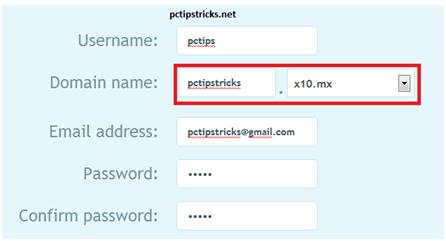
1.Goto to X10 hosting and register for free hosting.


Note:During signup you should note down  the URL that has been highlighted with red color

2.Download this script.Click Here To Download

3.Extract this with winrar or winzip.

4.Login into your x10 hosting account Cpanel.

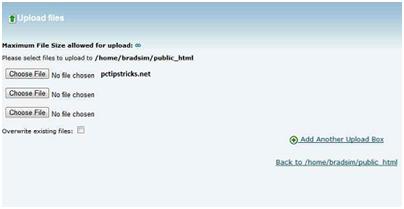
5.Click on filemanager and Upload all the three files in your server.


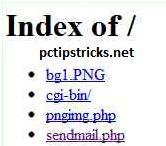
6.Now type site name that you created during signup.

7.Now click on Sendmail.php


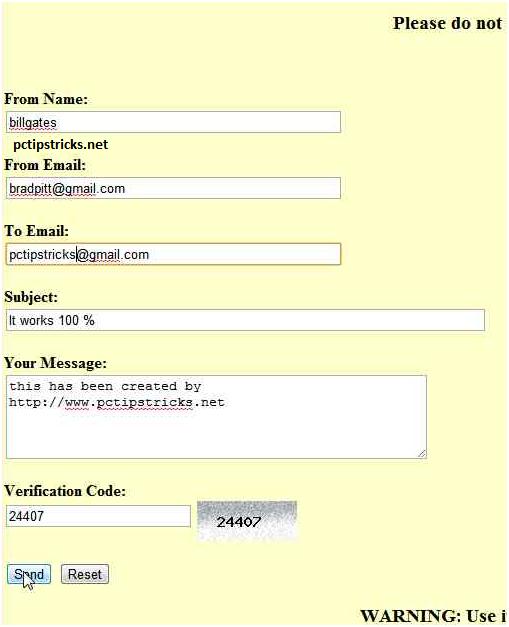
8.Now enter the fields and send anonymous emails!!


WARNING: ALL THE INFORMATION PROVIDED IN THIS POST ARE FOR EDUCATIONAL PURPOSES ONLY. I AM NOT RESPONSIBLE FOR ANY MISUSE.

Read More

Very Useful Links Library


  • Torrent Download

 http://www.torrentz.eu/                             My Favorite

Find All Torrents With This
1. http://www.isohunt.com/                        My Second Favorite
2. http://www.thepiratebay.org/                  My Third Favorite
3. http://www.btjunkie.org/
4. http://www.torrentz.com/
5. http://www.extratorrent.com/
6. http://www.torrentreactor.net/
7. http://www.demonoid.com/
8. http://www.kickasstorrents.com/
9. http://www.torrentdownloads.net/
10. http://www.sumotorrent.com/
11. http://www.onlytorrents.com/
12. http://www.fenopy.com/
13. http://www.torrentportal.com/
14. http://www.seedpeer.com/
15. http://www.torrents.to/
16. http://www.isohunt.com/


  • Creators For Your Website

[ 1 ] http://wufoo.com/
[ 2 ] http://www.jotform.com/
[ 3 ] http://formsite.com/
[ 4 ] http://www.accessify.com/tools-and-wizar...m-builder/
[ 5 ] https://www.formspring.com/
[ 6 ] http://www.emailmeform.com
[ 7 ] http://kontactr.com
[ 8 ] http://www.formmail-maker.com/
[ 9 ] http://www.phpform.org/formbuilder/
[ 10 ] http://visitorcontact.com/


  • Hosting

http://www.zippyvideos.com
Max File Size: 5MB
File deleted if not viewed for 60 days


http://www.uploadx.net
Max File Size: 3MB


http://www.filepost.us
Max File Size: 3MB
Free registration required


http://www.thefilebucket.info
Max File Size: 2MB (not sure)
Free registration required


http://storagefun.com
Max File Size: 2MB
Free registration required


http://www.flypicture.com
Max File Size: 1MB
File deleted after 30 days


http://www.bestupload.com
Max File Size: 600K
File deleted if not downloaded for 30 days


  • Top 10 Password Crackers

1. http://www.oxid.it/cain.html
2. http://www.openwall.com/john/
3. http://freeworld.thc.org/thc-hydra/
4. http://www.aircrack-ng.org/
5. http://www.l0phtcrack.com/
6. http://airsnort.shmoo.com/
7. http://www.solarwinds.com/
8. http://www.foofus.net/fizzgig/pwdump/
9. http://project-rainbowcrack.com/
10. http://www.hoobie.net/brutus/


  • Top Packet Sniffers

1. http://www.wireshark.org/
2. http://www.kismetwireless.net/
3. http://www.tcpdump.org/
4. http://ettercap.sourceforge.net/
5. http://www.monkey.org/~dugsong/dsniff/
6. http://www.stumbler.net/
7. http://www.ntop.org/
8. http://etherape.sourceforge.net/
9. http://kismac.de/


  • Send Fake Mail

1. http://www.anonymailer.net/
2. http://www.mytrashmail.com/send_fake_email_new.aspx
3. http://www.webwizny.com/sendemail.php
4. http://www.sendanonymousemail.net
5. http://www.deadfake.com/send.aspx
6. http://www.fuzzmail.org
7. http://www.gilc.org/speech/anonymous/remailer.html
8. http://www.anonymousmail.net-anonymity.info
9. http://www.fakemailer.net/
10. http://www.fakesend.com/


  • Free Online Virus Scan

1. http://www.bitdefender.com/scanner/online/free.html
2. http://www.kaspersky.com/virusscanner
3. http://www.eset.com/us/online-scanner
4. housecall.trendmicro.com/
5. http://www.f-secure.com/en_EMEA-Labs/.../online-scanner
6. security.symantec.com/
7. virusscan.jotti.org/
8. http://www.virustotal.com/
9. http://www.garyshood.com/virus/
10. windowsxp.mvps.org/Scanners.htm
11. http://virusscan.jotti.org/
12. http://onlinescan.avast.com/
13. http://viruschief.com/
14. http://www.nanoscan.com/
15. http://ca.com/ro/securityadvisor/virusinfo/scan.aspx/


  • Free Full Version Cracked Software Download

1. thepiratebay.org
2. http://www.egydown.com/
3. flmsdown.net/
4. http://www.sysfilm.com/
5. http://www.renjusblog.com/
6. hambyah.info
7. http://www.btscene.eu/
8. http://www.downloadmost.com
9. fullkeygen.net
10. zzmesh.com
11. yangyangli.info
12. http://www.9down.com/
13. http://www.zcrack.com/
14. http://www.tissueonline.com/
15. http://www.dl4all.com/
16. club.myce.com
17. mwh-fz.co.cc
18. egydown.com

Read More

How to hide yourself from network users And give access to only specific user


Don't want your XP computer to show up in the network browse list (Network Neighborhood/My Network Places) to other users on your network? One way to accomplish that is to disable file sharing. To do this, click Start, right click My Network Places and select Properties. Right click your local area connection and click Properties. Uncheck the box that says File and Printer Sharing for Microsoft Networks. Click OK.

But what if you want to be able to share folders with some users; you just don't want everyone on the network to see your computer's shares? There's a way:
Click Start and select Run.
In the Run box, type net config server /hidden:yes
Click OK.
Now others who know the UNC path (\\computer name\share name) can connect to your computer's shares from the Run box, but it won't show up in the network browse list.
Read More

How can you watch free Tv on your pc by just using a VLC player.

Just Follow these steps: s2ptech.blogspot.com

Step 1 : First of all you need to have VLC player, if you don’t have vlc player kindly download and install it

Step 2 : Now open Vlc Player, and select streaming option from the media menu present in the menu bar


Step 3 : Select network option and enter the url of the streaming channel. For example if you want to view B4u Music you need to add url rtsp://217.146.95.166:554/playlist/ch12zqcif.3gp in the url field and then select play option from the stream drop down menu


Step 4 : After you click play in the above step, the channel will start streaming and you can watch your favorite channels s2ptech.blogspot.com


Here is the List of many other channels which you will love to watch For more information: s2ptech.blogspot.com
Channel Name
Links
HOLLYWOOD CHANNELS


MUSIC BOX - rtsp://stream.the.sk/live/musicbox/musicbox-3m.3gp
AFTVAdventure - rtsp://video3.multicasttech.com/AFTVAdventure3GPP296.sdp
AFTVClassics.- rtsp://video3.multicasttech.com/AFTVClassics3GPP296.sdp
AFTVComedy - rtsp://video3.multicasttech.com/AFTVComedy3GPP96.sdp
AFTVCrime - rtsp://video2.multicasttech.com/AFTVCrime3GPP296.sdp
AFTVHorror - rtsp://video2.multicasttech.com/AFTVHorror3GPP296.sdp
AFTVMystery – rtsp://video2.multicasttech.com/AFTVMystery3GPP296.sdp
English songs live – rtsp://stream.zoovision.com/live.sdp
B4U Music – rtsp://217.146.95.166:554/playlist/ch12zqcif.3gp
Clubbing TV – rtsp://217.146.95.166:554/playlist/ch21yqcif.3gp
Bella Club[18+] – rtsp://217.146.95.166:554/playlist/ch29yqcif.3gp
PDF – rtsp://217.146.95.166:554/playlist/ch11yqcif.3gp
iMusic1 – rtsp://217.146.95.166:554/playlist/ch26yqcif.3gp
Fation tv FTV [18+]- rtsp://217.146.95.166:554/playlist/ch27yqcif.3gp
HiTV [africa]- rtsp://217.146.95.166:554/playlist/ch13yqcif.3gp
WWF best channel- rtsp://217.146.95.166:554/playlist/wwf_coral_triangle_turtle_qcif1_ym1.3gp
Ads channel (showing best ads)- rtsp://217.146.95.166:554/vod_rtsp/goviral/swatch_greece_qcif1.3gp
Guitarist TV (teach guitar)- rtsp://217.146.95.166:554/playlist/ch1yqcif.3gp


For More Stuffs: Click On s2ptech.tk


Read More